See everything on your Tonverk card. Lose nothing.
TonVault is a Mac app for Tonverk owners. It scans your SD card, shows every sample with waveform and metadata, flags the problems Tonverk won't warn you about, and keeps verified backups of your work.

$4.99 once · macOS 14 or later
Elektronauts
Built with Tonverk owners.
TonVault started as a question on the Elektronauts forum, before any of it was built, and most of what has changed since launch came from the people in that thread. It's still where bug reports and ideas go. Read the thread on Elektronauts
What it does
Four jobs, done carefully.
TonVault reads your card and never reorganizes it. Everything that changes a file writes a new copy on your Mac and leaves the original where it is.
01 · Library
Your card, finally legible.
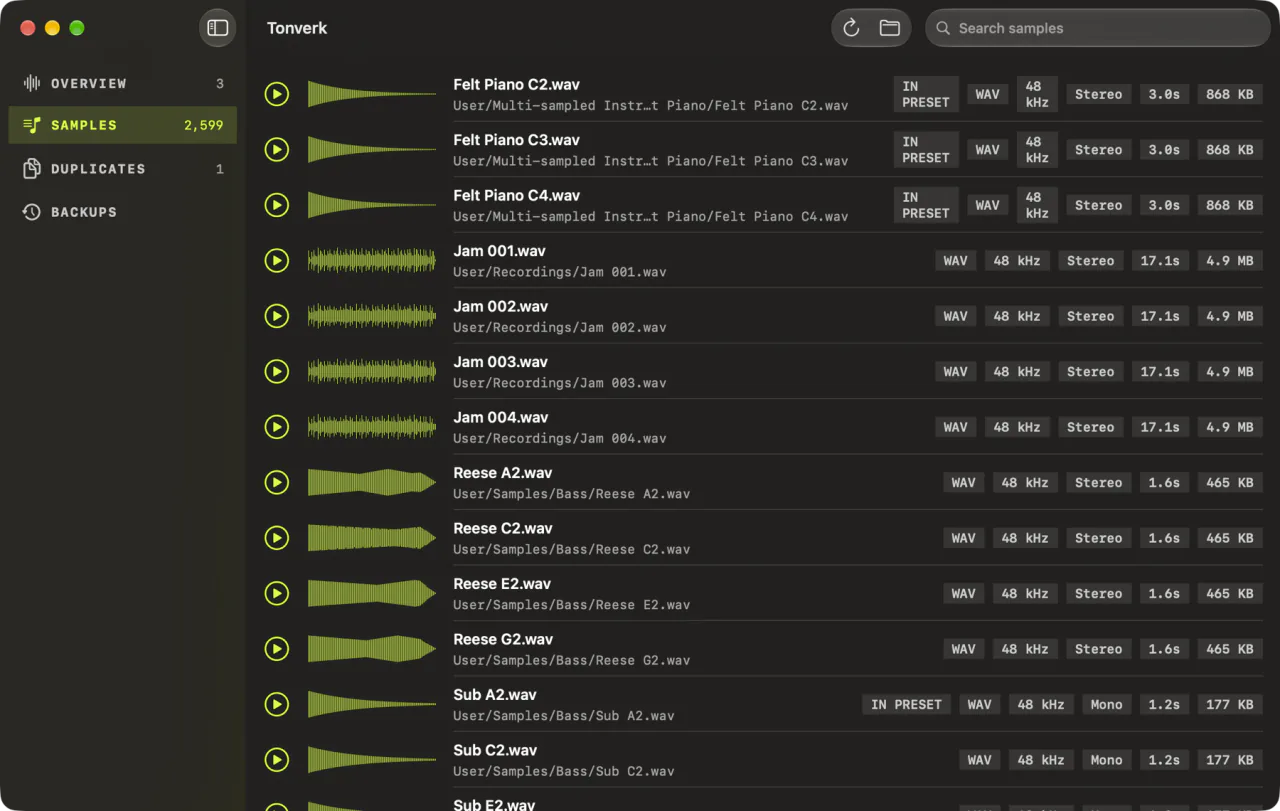
Every sample on the card with its waveform, sample rate, bit depth, mono or stereo, length and location. Search by name and listen to a sample on the Mac before you load it on the Tonverk.
02 · Health check
What to look at, in plain words.
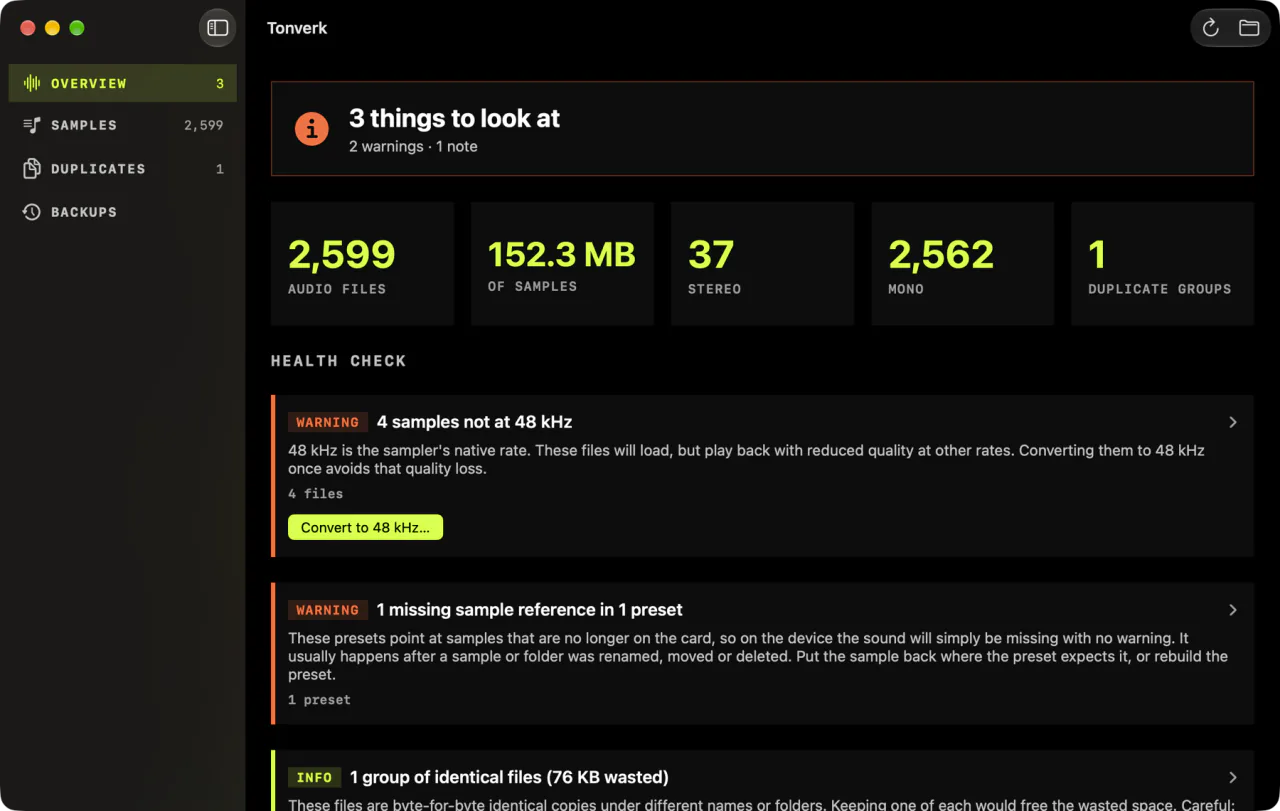
Eight checks for problems the Tonverk doesn't warn you about, each explained: what it found, why it matters, and what to do about it.
03 · Duplicates
Space back, safely.
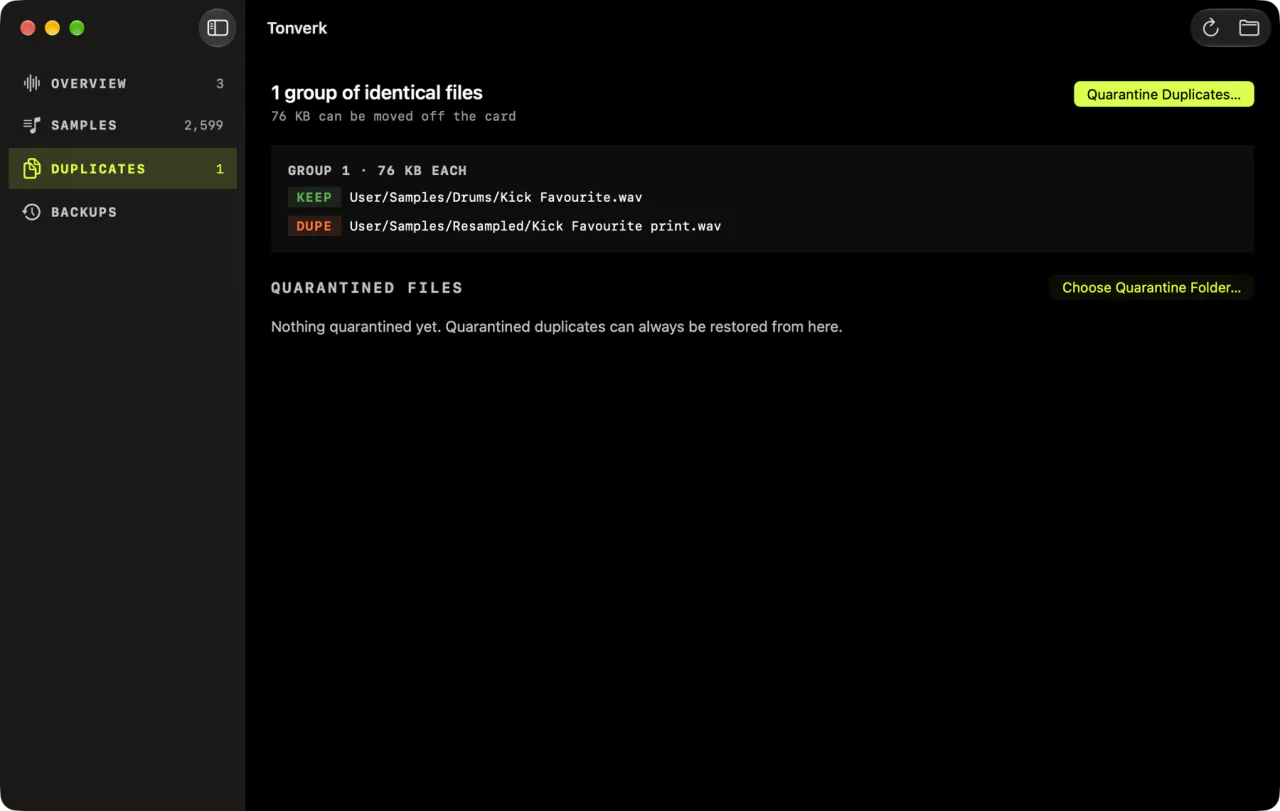
Files that are byte-for-byte identical, found by checksum, with the space they take. When you ask, the spare copies move to a quarantine folder on your Mac, only after a verified copy is there, and any of them can go back.
04 · Backup
Verified, not hopeful.
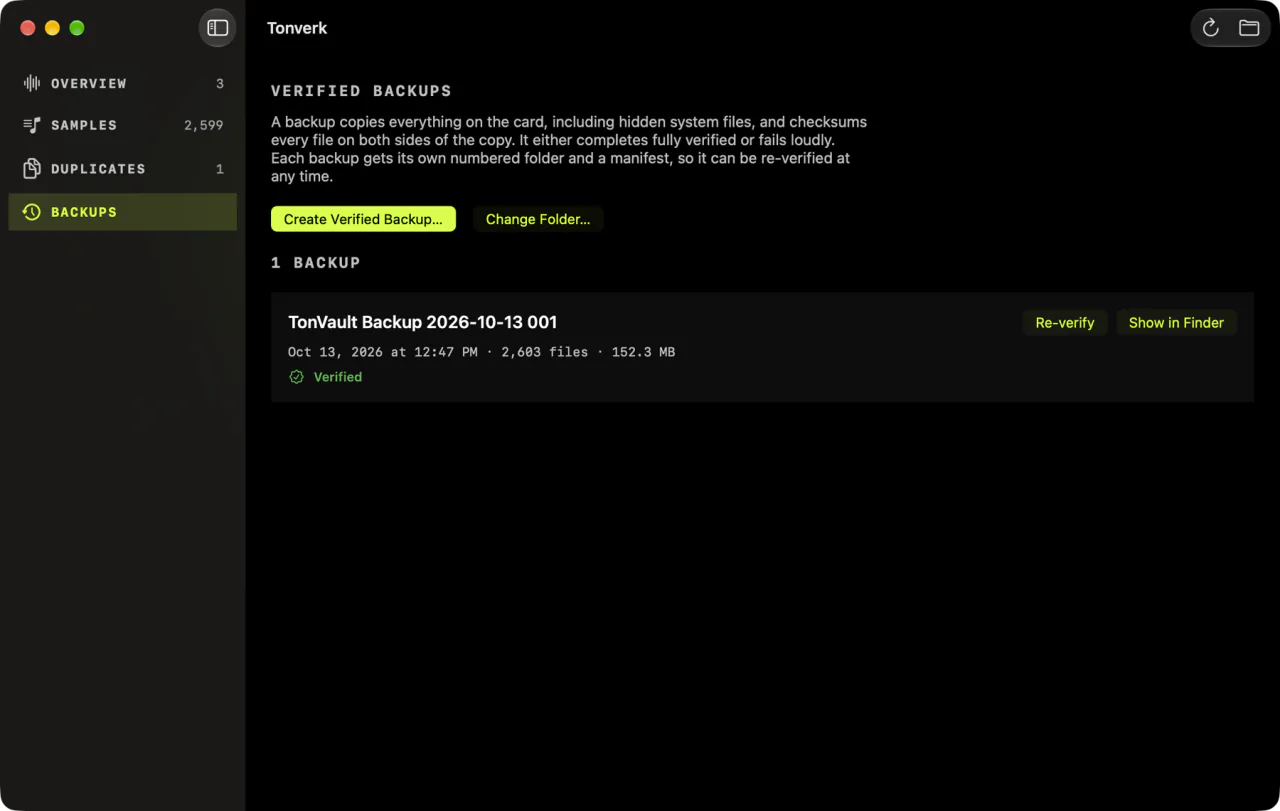
A full copy of the card on your Mac, with every file checksummed on the card and again on the Mac, hidden files included. Each backup has its own numbered folder and can be checked again whenever you like.
Health check
What the Tonverk won't tell you.
8
Problems the Tonverk doesn't warn you about, checked on every scan. None of it changes your card, and nothing on the card is ever deleted.
Can't play
Audio in a format the Tonverk doesn't load, so it never shows up in the sample browser.
Couldn't read
Files whose format TonVault can't parse. Some are fine on the device, so it names them and you decide.
Not 48 kHz
They load, but the manual says they lose quality on playback. TonVault can write 48 kHz copies.
Missing samples
A preset whose sample was moved, renamed or deleted, which on the device just plays nothing.
Silence first
Multi-sampled instruments that start with silence, so every note starts a little late.
Identical files
The same sample saved twice or more under different names, and how much space that takes.
Empty folders
Harmless, but they clutter the browser on the device.
Outside USER
Samples outside the USER folder, which a USER-only backup would miss.
Guides
For the card you already have.
Guide
Backing up a Tonverk SD card
The manual's way, what a Finder copy doesn't tell you, and how to know a backup is complete.
Guide
Samples that aren't 48 kHz
What happens to them on playback, how to find them, and how to convert them without breaking a preset.
Guide
Moving a library to a new card
Why every file has to land in the same place, and how to check the new card before you trust it.
How it's sold
Runs on your Mac. Paid for once.
On your Mac
It works offline, with no account to make, and it makes no network connections of its own.
Paid for once
On the Mac App Store, with no subscription, no in-app purchase and no ad.
Data Not Collected
The privacy label on the Mac App Store, as Apple shows it.
I own a Tonverk, and a few months in, my SD card was already getting away from me. I wanted to see every sample, know what the Tonverk would quietly get wrong, and trust my backups. So TonVault reads the card, never changes it, and runs entirely on your Mac.
Jarl
Good to know
Questions, answered.
What does TonVault do?
It scans your Tonverk SD card and turns it into a searchable sample library, with a waveform and the details of every file. It runs a health check that explains the problems the Tonverk won't warn you about, finds duplicate files, and keeps verified, versioned backups of the card on your Mac.
Does TonVault ever delete or change anything on my card?
No. Converting, trimming and normalizing write new copies to your Mac and leave the originals as they are. The one thing that can leave the card is a duplicate you choose to quarantine, and it moves to a folder on your Mac only after a checksum-verified copy is there. Restoring puts it back.
Does it read my projects, patterns or parameter locks?
No. TonVault looks after the files around your music, not the music itself. It never opens or changes Tonverk project data.
Which audio files does it understand?
The formats the Tonverk plays, which are WAV, AIFF, FLAC, M4A and CAF. It shows each file's sample rate, bit depth, channels, length and size, and flags files that aren't 48 kHz, because those play back with reduced quality on the Tonverk.
Do I need an account or an internet connection?
No. TonVault runs entirely on your Mac. There's no account and no cloud, nothing is tracked, and it works offline.
What does it cost?
It's a one-time purchase on the Mac App Store. There's no subscription, no in-app purchase and no ad.
Is TonVault made by Elektron?
No. TonVault is an independent app and is not affiliated with Elektron.
TonVault
$4.99 once · macOS 14 or later
TonVault is an independent app and is not affiliated with Elektron.